Agonist Platform How it works Blog
EN TR
Agonist • OT / Industrial Cyber Security Platform

Test your defenses.
Prove them.

Prove whether your OT security actually works — without touching production.

Agonist proves whether your OT security actually works — and makes every device on your industrial (OT) network visible. It safely puts your defenses to the test, so protection becomes something you can show, not just assume. All without stopping production.

Discover — what's on the network? Simulate — protocol behavior & command sets Prove — do the controls actually work?
24protocol families & command domains
600+OT command sets & test actions
580+threat-scenario signatures
What is Agonist

Proof, not assumption.

Agonist proves whether your OT security actually works — and makes every device on your industrial (OT) network visible. It safely puts your defenses to the test, so protection becomes something you can show, not just assume. All without stopping production.

Needs it solves

Three hard questions in OT security

Industrial (OT) networks differ from IT: they can't tolerate downtime, devices are fragile, and classic security tools don't fit. Three problems organizations get stuck on:

Continuity
“I want to test — but I can't stop production.”
Conventional tests can disrupt the process or damage hardware, so most OT networks go untested. Agonist tests safely — without stopping anything.
Proof
“Do my security controls actually work?”
You've bought firewalls, IPS, SIEM and honeypots — but does a PLC-stop actually raise an alarm? Proof beats assumption.
Visibility
“What exactly is on my network?”
Hand-kept lists go stale. Most teams don't fully know which PLCs, HMIs and RTUs are running — and you can't protect what you can't see.
Agonist solves all three: it discovers, tests safely, and produces evidence — controlled and without disrupting production.
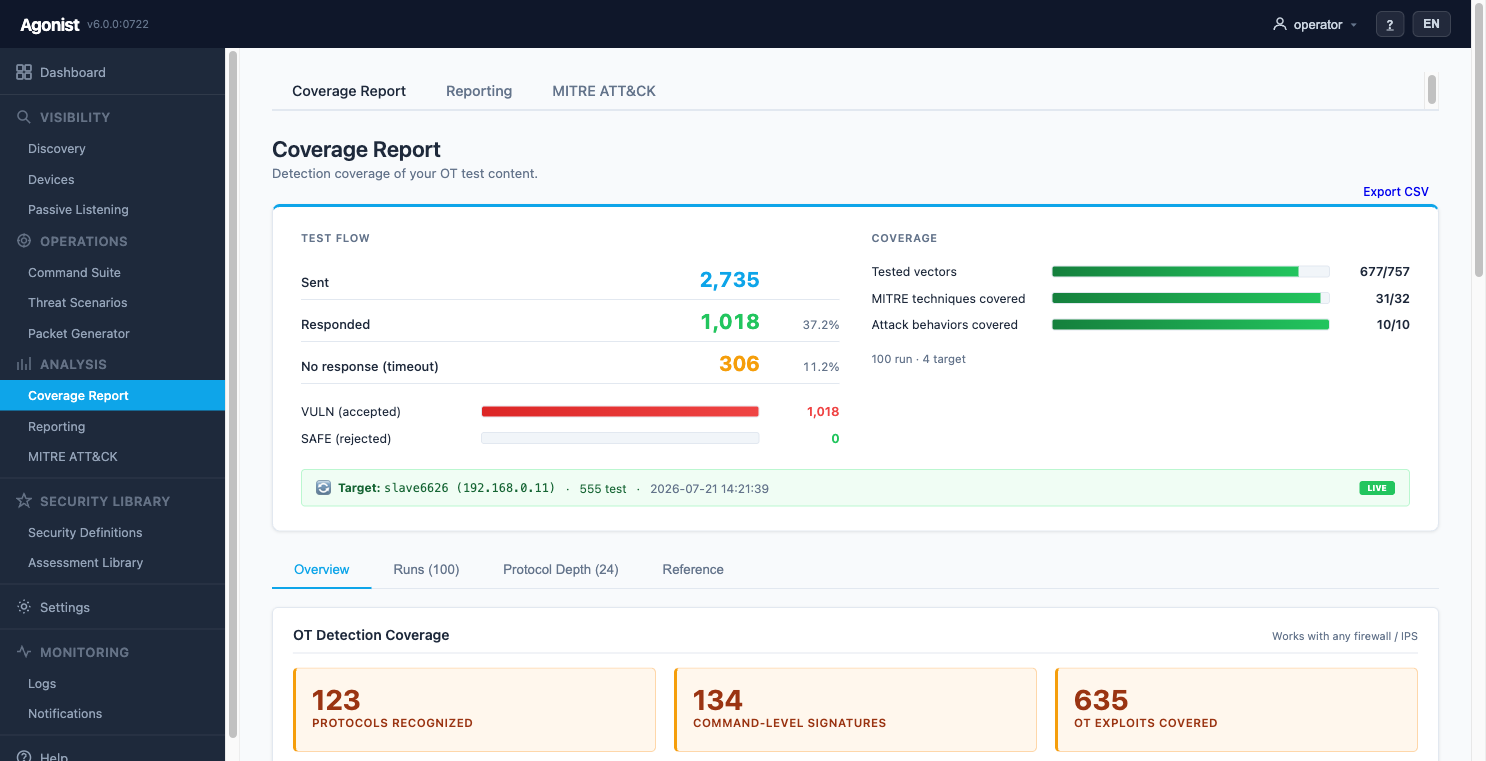
Coverage result
Example output — which attacks were caught, which slipped through.
Capabilities

Six things it does

One platform, one console — see them in action further down.

Protocol Simulation

Safely reproduce realistic OT protocol behavior and command sets against a test target.

Control Validation

See whether your SIEM / IPS actually catches them.

Tabletop Exercise

Rehearse an incident end to end with your team.

Visibility

Auto-discover every device — a live inventory.

Vulnerability Detection

Match known CVEs and rank them by urgency.

Protection Test

Check whether your device protections really hold.
Easy to follow

How a test works — in four steps

No deep OT expertise needed. Every test follows the same simple flow.

1

Choose a target

A device on your network, or the safe Lab simulator — you decide.

2

Run a protocol simulation

A realistic OT protocol behavior or command set, run in a controlled and harmless way.

3

Did your defenses catch it?

See whether your SIEM/IPS raised an alarm — or the attack passed silently.

4

Get evidence & report

A clear pass/fail record — ready for audit and for hardening what failed.

Product tour

A look at what it does

Real views from the product, next to a plain-language explanation. Click any image to enlarge.

Overview

Everything on one screen

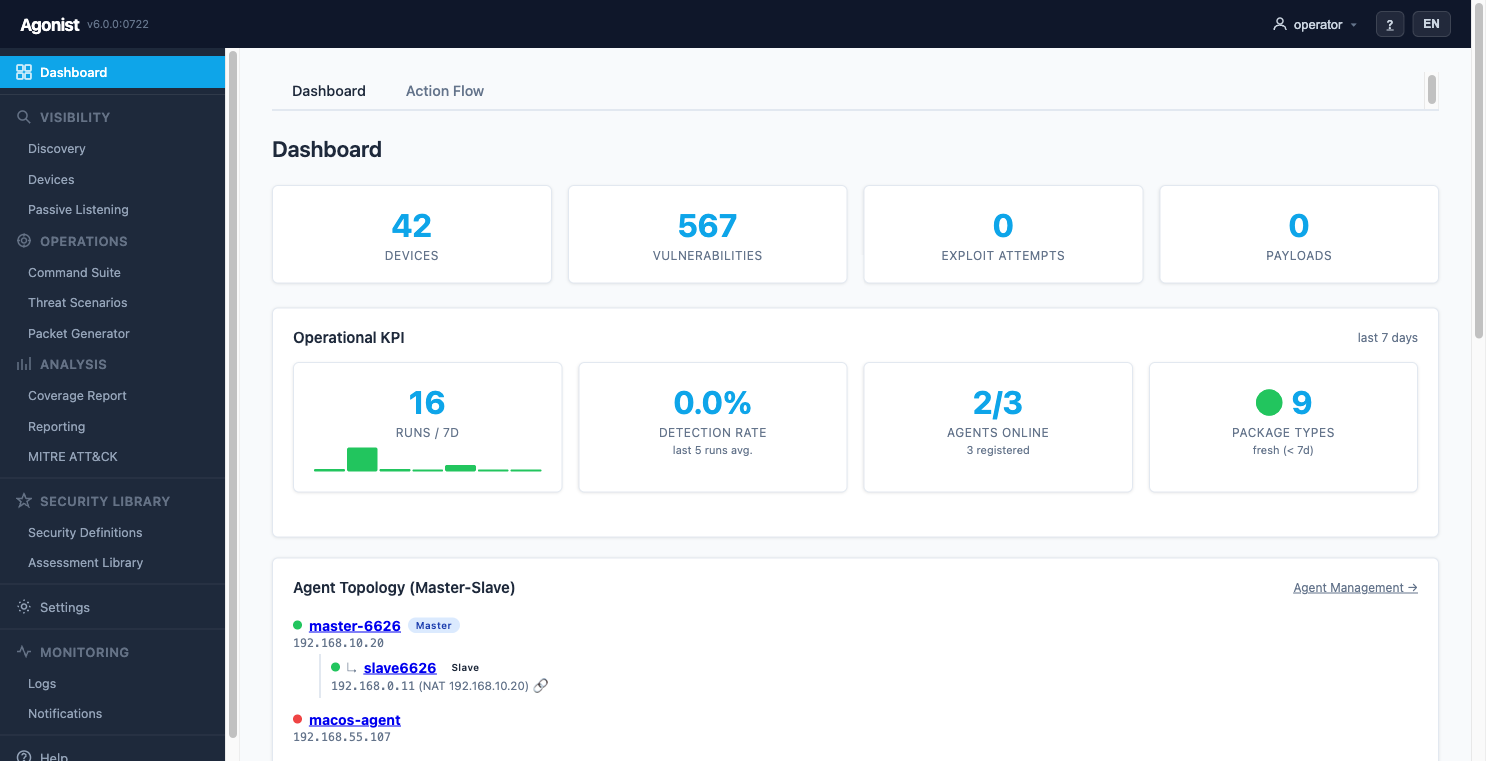
The dashboard shows your whole OT security posture at a glance — how many devices, how many vulnerabilities, whether your agents are online, and recent test activity.

  • Live device and vulnerability counts
  • Agent health and master–slave topology
  • Recent test runs and detection rate
Dashboard
Visibility

Know every device

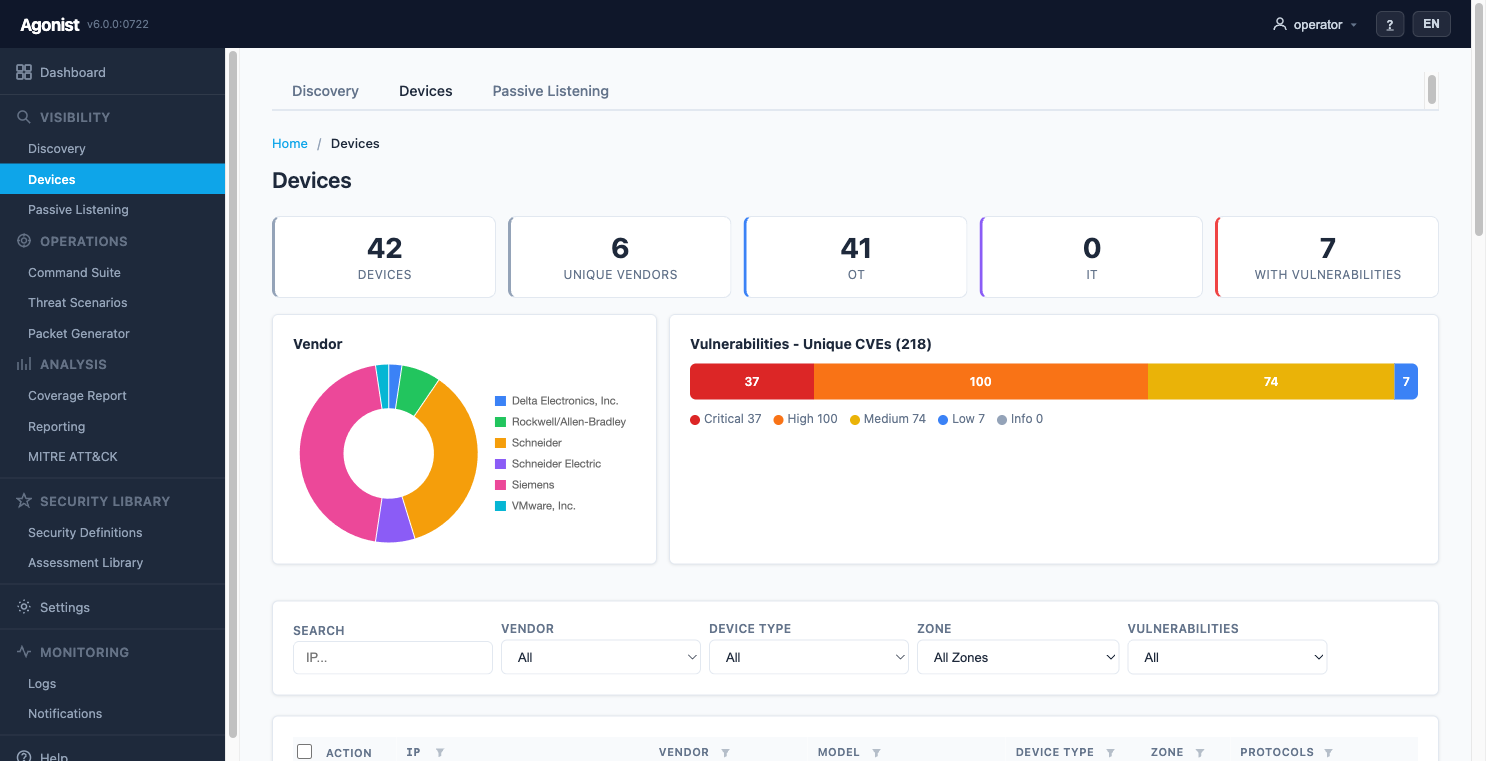
Agonist automatically finds every industrial device and builds a live inventory — vendor, model, protocols and zone — so nothing hides on your network.

  • Multi-vendor: Schneider, Siemens, Rockwell and more
  • Flags fake / decoy devices (honeypots)
  • Known vulnerabilities matched per device
Honeypot detection
Close-up: fake / decoy devices flagged automatically
Device Inventory
Protocol Simulation

Safely simulate real OT techniques

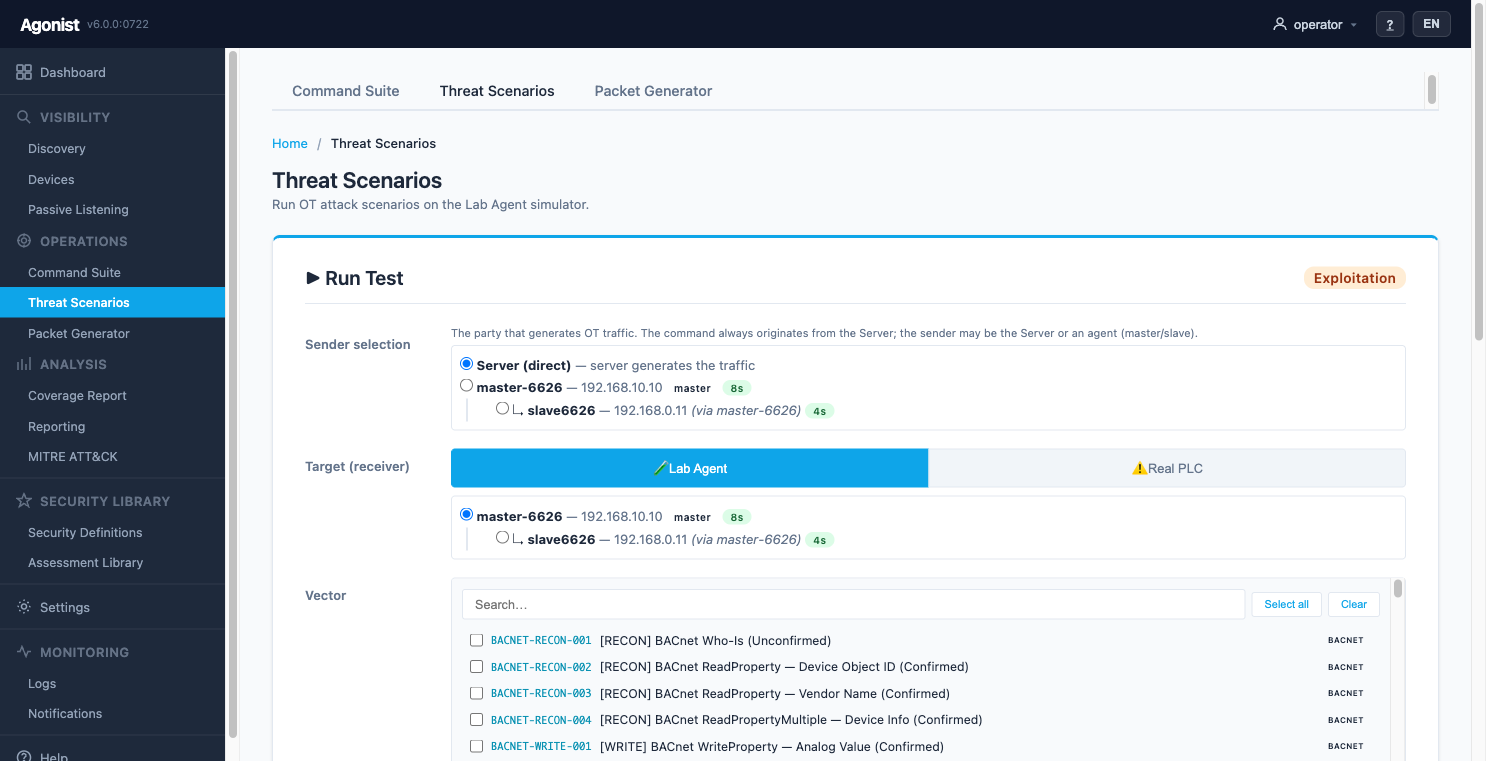
Choose a target and run real OT attack techniques in a controlled, harmless way. Point them at the safe Lab simulator or, when you're ready, a real device you own.

  • Hundreds of attack vectors — mapped to CVEs & MITRE ATT&CK
  • Lab Agent target — zero risk
  • Clear vulnerable / protected result per device
Target selection
Close-up: aim at the safe Lab simulator — or a real device you own
Protocol Simulation
Control Validation

Proof your controls work

After the tests, see exactly which attacks your defenses caught and which slipped through — the evidence auditors and management ask for.

  • Coverage by protocol, MITRE technique and behavior
  • Vulnerable vs. protected, at a glance
  • Export to CSV / report
Detection coverage numbers
Close-up: protocols, signatures and exploits covered
Detection Coverage
Safe by design

You decide the risk

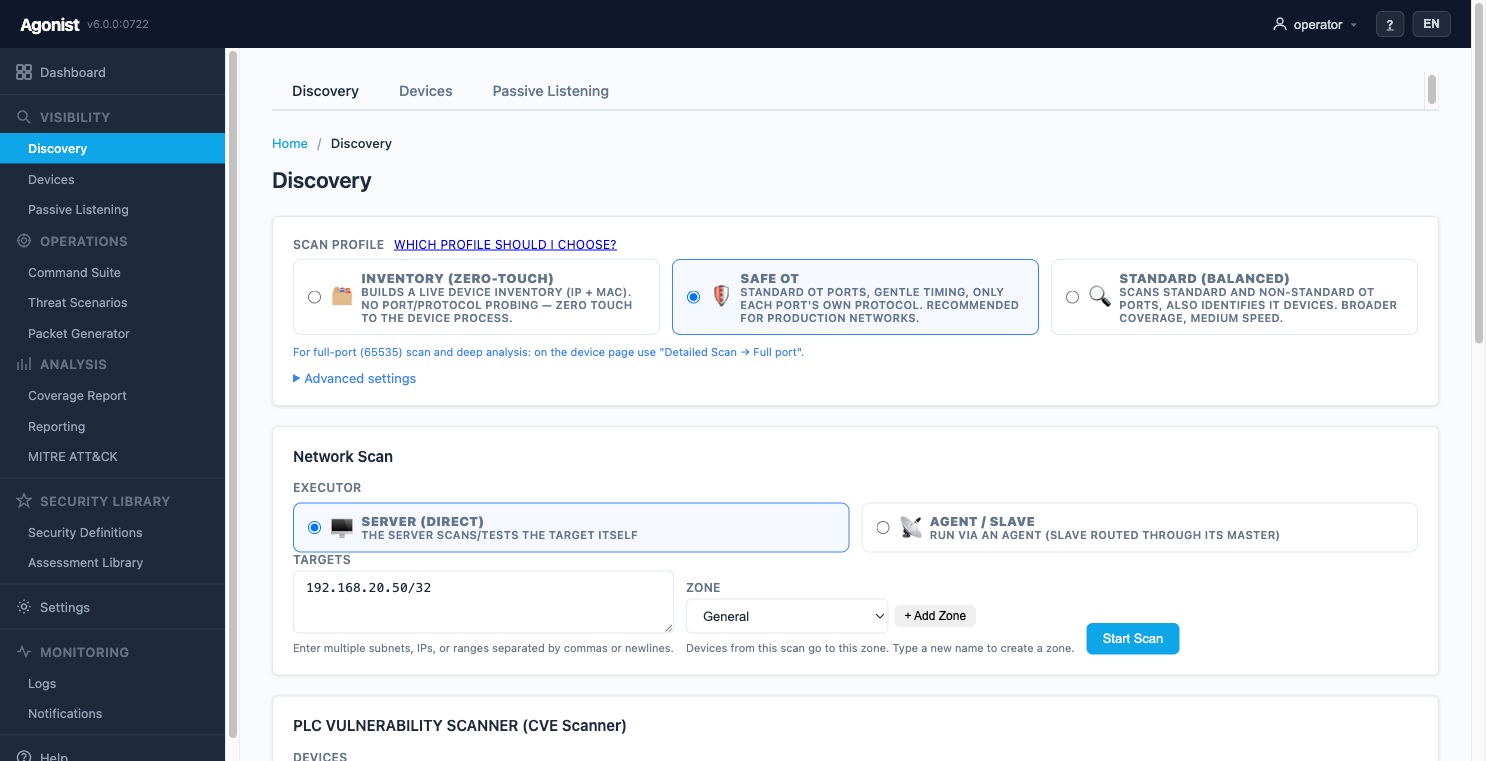
Pick how gentle the scan is: fully passive (no packets), safe discovery (the production default), or detailed — only when you enable it.

  • Passive / Safe / Detailed profiles
  • Designed for fragile production networks
  • Run from the server or a field agent
Safe Scanning
The biggest difference

Without stopping production

In production networks the real issue isn't “being able to test” — it's testing without causing harm. With Agonist you choose the method to fit your need: on the most sensitive network you can listen fully passively — sending no packets at all — and go more detailed when needed. The default is the safest method, designed for production.

Passive listening
Only listens to the network, sends no packets — zero touch to the device.
minimum risk
Safe discovery (default)
Gentle, cautious inspection — designed for production, minimal touch to the device.
very low
Detailed (when needed)
More thorough inspection — only for non-sensitive / test environments, enabled by you.
optional

“First, do no harm.”

On a production network the default is the safest, least-touch method; in the most sensitive environments you can run fully passively. Broader inspection only kicks in when you enable it, usually in test environments — the decision is always yours.

Scan profiles
In the product — Passive / Safe / Detailed scan profiles.
How you get it

Own it — or consume it as a service

You can deploy Agonist as a permanent product — or consume it as a service from a partner, whether as an ongoing managed service or a short, project-based engagement.

Ownership · continuous

Enterprise License

You deploy and operate the product yourself — cloud, on-premise, hybrid or fully offline. Inventory, tests and reports stay with you.

For: Organizations that want continuous OT visibility and testing, with their own team.
Managed / project-based

As a Service

A service provider or partner runs Agonist for you — you just receive the results and reports. It can be continuous (a managed subscription, multiple sites from one console) or short-term for a specific need: a tabletop exercise, a vulnerability assessment or an attack simulation. The partner works with a license from the vendor; you don't own the product.

For: Organizations that don't want to build their own team, or that need a specific exercise/assessment outcome without a permanent tool — and partners who deliver it as a service.
Technical details

Architecture, topology & deployment

For IT / security teams: how it's built and where it runs. Click to expand.

How it works

Two components, one intelligence engine

Your organization deploys only two things: the Central Server that runs the management console, and the Field Agent on the industrial network. Both are fed by continuously updated OT threat intelligence in the background.

  • Central Server. Management console: scanning, discovery, scenarios, reporting. Deployed to the cloud or your own infrastructure.
  • Field Agent. Runs on the industrial network; discovers and connects to the center over a secure channel. Can be chained master–slave for isolated OT.
OT threat intelligence, continuously updated in the background. New vulnerabilities, attack signatures and device profiles flow in as current, signed content. Internet need is minimal — only to pull this content. In a fully offline (air-gap) architecture no internet is required; you update the content yourself via portable media.
Intelligence Service — signature & content
Your component · Center
Server — Management Console
Interface · scan · report
Your component · Field
Agent — Industrial Network
Discovery · monitoring
Network topology

Where it sits in your network

Two components fit into a familiar layout: the Central Server in the management layer (DMZ or IT), the Field Agent on the industrial network. For isolated OT segments that can't be reached directly, agents are chained master–slave — without breaking isolation at all.

Vendor · Cloud OT Threat Intelligence — signature · CVE · profile minimal internet · content only ↓ Corporate IT · Level 4–5 Office network · email · servers DMZ / Management · Level 3–3.5 Your component · Center Server — Management Console secure connection · WebSocket ↓ OT / Industrial Network · Level 0–2 Your component · Field Agent — discovery · monitoring · test ↓ industrial devices PLC controller RTU field unit HMI operator panel
Standard placement. Server in the management layer, agent on the industrial network; intelligence flows with minimal internet. On flat networks a single agent is enough.
Center Server — Management Console WebSocket ↓ Reachable OT · gateway Master Agent — concentrator / relay ✕ no direct access — only via the master ↓ Isolated OT cell · microsegment Slave Agent — in the isolated segment ↓ local industrial devices PLC controller PLC controller HMI operator panel Isolation preserved: one controlled channel out of the cell — only to the master.
Isolated OT — master → slave. The isolated segment is never reached directly; the slave reaches the center only via the master. Microsegmentation stays intact.
Technical detail · Deployment

…and it's deployed to fit your infrastructure

When you run the product yourself, the capabilities are the same in every scenario. The only thing that changes is where the Central Server runs and where your data sits. Four alternatives based on your cloud policy, critical-infrastructure and data-sovereignty requirements, and network:

Cloud-Managed Service

Managed · SaaS

“You stay in the field — we run the management.”

  • Set up in minutes — infrastructure, updates and maintenance aren't on you.
  • Manage multiple sites/customers from one console (MSSP/multi-tenant).
  • Always the latest content — automatically.
For
Organizations without their own server team who want a fast start, and service providers (MSSP).
Intelligence Service → content
Cloud · managed service
Center
Server (cloud)
Hosted by vendor / MSSP
Your site
Field
Agent
On the industrial network

On-Premise

Your data

“Your data never leaves the building.”

  • Scan results, inventory and reports stay entirely with you.
  • Suitable for critical-infrastructure and data-sovereignty requirements (e.g. IEC 62443, air-gap mandates).
  • Only a limited, controlled connection to the vendor for license/updates.
For
Energy, water, manufacturing, defense — critical infrastructure where data must stay on site.
Intelligence Service → signed content package
Your infrastructure
Center
Server (on-prem)
Field
Agent

Hybrid

Balanced

“Control is yours, freshness is automatic.”

  • On-premise data control + automatic freshness together.
  • Central monitoring/telemetry can be enabled (optional).
  • A remote-support tunnel can be opened and closed — you decide.
For
Organizations that want to keep data on site but don't want to deal with manual updates.
Intelligence Service ↕ live content stream
Your infrastructure
Center
Server (on-prem)
Field
Agent

Fully Offline (Air-gapped)

Isolated

“No internet — no problem.”

  • Signed offline license — no internet required.
  • Content packages are loaded manually via portable media.
  • Five-layer anti-tamper stays active even offline.
For
The highest-security isolated OT networks with no internet access.
Intelligence · hand-carried content package
Isolated network · air gap
Center
Server + offline license
Field
Agent
CriterionCloud-ManagedOn-PremiseHybridFully Offline
OT data stays on sitenoyesyesyes
Internet connectivity needcontinuouslimitedcontinuousnone (air-gap)
Critical infrastructure / data sovereigntymediumhighhighhighest
Who carries setup & maintenancevendororganizationsharedorganization
Content freshnessautomaticvia packageautomaticmanual · you
Multi-site / service-provider mgmtyessingleoptionalsingle
Flat network

Single Agent

If the OT network is reachable from the center, one agent is enough.

Isolated OT · microsegment

Master → Slave chain

If the OT segment can't be reached directly, the master sits at the gateway and the slave in the isolated segment reaches out only via the master — without breaking isolation.

Deployment form

Appliance options

Virtual machine (VMware/OVA — zero-touch), Docker, or a locked-down hardware appliance.

Contact

Get in touch

A demo, a pilot, or a question — send a message, or email info@agonist.dev directly.